
VyOS EVPN-VXLAN Distributed Anycast Gateway




What are the benefits of EVPN-VxLAN Anycast Gateway?
A distributed anycast gateway is a default gateway addressing mechanism for EVPN-VXLAN fabrics. It enables the use of the same gateway IP address across every leaf switch that participates in a given VXLAN network, so that each leaf can function as the default gateway for the workloads directly connected to it.
The feature underpins flexible workload placement, seamless host mobility, and optimal traffic forwarding across the VXLAN fabric, removing the need to home default gateway processing to a single device or a fixed pair of devices. VyOS enables EVPN-VXLAN distributed anycast gateway deployments with a consistent, automation-friendly network configuration model, helping teams deliver local routing, resilient forwarding, and seamless workload mobility across the fabric.
The Distributed Gateway Scenario
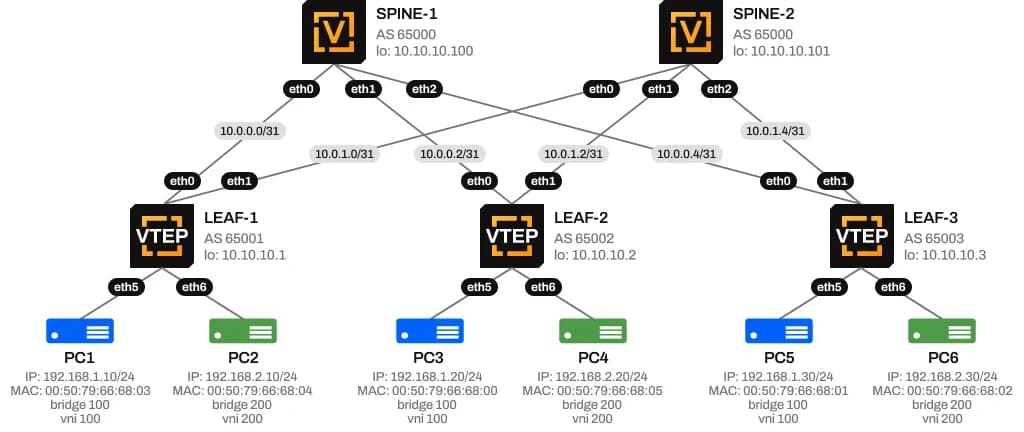
The following scenario illustrates a typical EVPN-VXLAN deployment in a Leaf–Spine topology. In this For example, PC1 needs to communicate with PC6. Because the two hosts belong to different Layer 2 segments, VLAN 100 for PC1 and VLAN 200 for PC6, the traffic must be routed through the default gateway. Therefore, PC1 first needs to learn the MAC address associated with its gateway IP address (192.168.1.1). One of the key advantages of EVPN is seamless host mobility. If PC1 moves from a location connected to LEAF-1 to a location connected to LEAF-2, it can retain the same IP address and default gateway configuration. Additionally, PC1 does not need to relearn a new default gateway MAC address, as the gateway is presented consistently across the fabric.
In this topology, PC1 and PC3 are connected to LEAF-1 and LEAF-2, respectively, while remaining in the same VLAN. They are used to represent the movement of PC1 between leaf switches. PC6 is connected to LEAF-3 and resides in VLAN 200.
Why this matters for host mobility
If PC1 moves from Leaf Switch 1 to Leaf Switch 2 while remaining on the same VXLAN network, it still holds the ARP entry it learned for the gateway MAC and IP address on Leaf Switch 1. Without a distributed anycast gateway, the MAC address of the VLAN interface on Leaf Switch 2 would differ from that of Leaf Switch 1, creating a mismatch between the host's cached ARP entry and the actual gateway MAC on Leaf Switch 2. Traffic destined outside Subnet 1 would then be silently dropped or continuously flooded as unknown unicast.
EVPN-VXLAN distributed anycast gateway prevents this failure mode by ensuring every leaf switch presents the same gateway MAC address in addition to the same gateway IP address, so a host's cached ARP entry remains valid no matter which leaf switch it is currently attached to.
EVPN-VXLAN Distributed Anycast Gateway
 Download Solution Brief
Two Ways to Align Gateway MAC Addresses
To keep the MAC address in a host's ARP entry consistent with every leaf switch's gateway MAC, a VXLAN fabric can use either of two approaches. In both cases, the VLAN SVIs on all leaf switches must already share the same gateway IP address.
Manual MAC Configuration
- This is the conventional approach: the same MAC address is manually configured on the corresponding Layer 2 VNI VLAN's SVI on every leaf switch in the VXLAN network. In the Subnet 1 example above, configuring the identical MAC address on Leaf Switch 1 and Leaf Switch 2 guarantees that Host Device 1's ARP entry for the gateway matches both leaf switches exactly.
MAC Aliasing
- MAC aliasing removes the need to hand-configure a shared MAC address on every VLAN interface. Instead, each leaf switch advertises the MAC address of its own VLAN interface to the other leaf switches as a gateway MAC address. Provided the advertised gateway IP address matches the local VLAN IP, the receiving leaf switch stores that MAC as a valid gateway MAC.
Key Benefits of VyOS EVPN-VXLAN Anycast Gateway
Enable seamless mobility and local routing with VyOS EVPN-VXLAN Anycast Gateway

Consistency
Consistent gateway identity: Hosts always resolve the same gateway IP and MAC, regardless of which leaf switch they attach to.

Mobility
Uninterrupted host mobility: Workloads can move between leaf switches without re-triggering ARP resolution or losing inter-subnet connectivity.

Flexibility
Flexible workload placement: Any leaf switch in the fabric can locally route traffic for directly connected hosts, avoiding traffic tromboning to a fixed gateway pair.

Forwarding
Resilient forwarding: Eliminates the unknown-unicast flooding and dropped-traffic conditions that arise from stale ARP-to-MAC mappings after a host moves.
When to Use EVPN Anycast Gateway
A distributed anycast gateway is worth deploying whenever a single VLAN or subnet is stretched across more than one leaf switch in an EVPN-VXLAN fabric, and workloads on that subnet may need to route out of it from any of those leaves.

Live VM or workload mobility
A VM moves between hosts attached to different leaf switches without re-learning a new gateway or losing connectivity mid-session.

Multi-rack or stretched L2 subnets
A VLAN is not confined to a single rack or leaf pair, so hosts need a consistent, local gateway no matter which leaf they are connected to.

Active-active dual-homed hosts
Servers multi-homed to two leaf switches (for example, via EVPN multihoming) need both leaves to answer as the same gateway.

Reducing traffic tromboning
Without it, inter-subnet traffic from a host on a non-owning leaf would have to detour to whichever leaf owns the gateway, even if the local leaf could route it directly.
It is generally unnecessary when every subnet lives entirely behind a single leaf switch, or behind a fixed gateway pair, with no mobility requirement; in that case a simpler static or VRRP-style gateway is sufficient.


Want to learn more about VyOS Technical Capabilities?
Download the Technical Datasheet

 Technical Datasheet
Resources
Here are some resources to help you learn more about VyOS, keep up with the development, and participate in it.


